Checkout Autofill
@whatisadobev2 · Bulk cards + 50 countriesAny checkout,
0 downloads
Any checkout,
filled in one click.
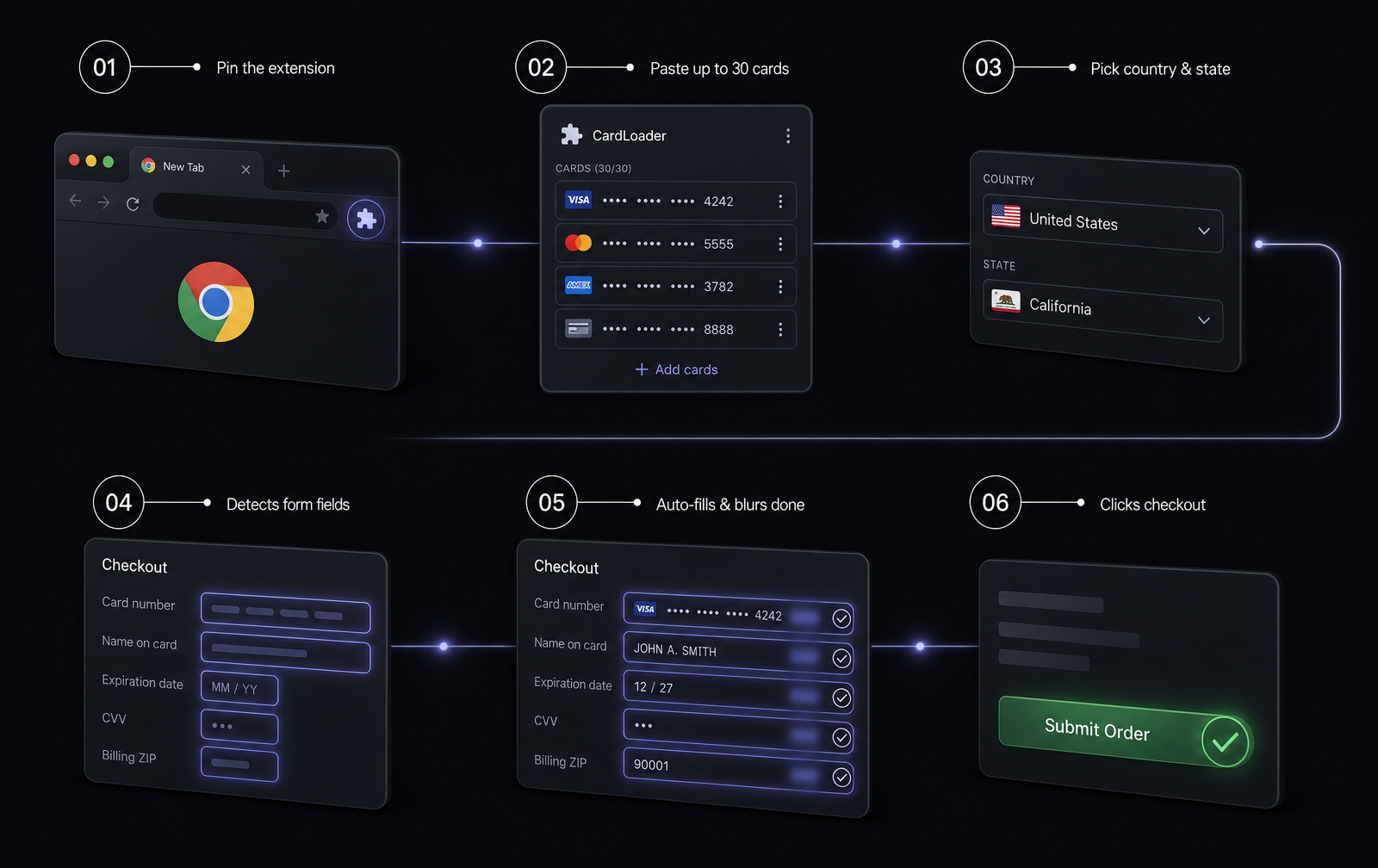
Paste up to 30 cards, pick a country, hit Fill. The extension detects the form, types every field, and clicks the checkout button for you.
Works in Chrome, Edge, Brave, Arc, Opera · No account required
The flow
Six steps, one click.
Features
Built for speed.
Bulk card loader
Paste up to 30 cards in any format. Number, MM/YY or MM/YYYY, CVV — all auto-parsed.
50 countries
Realistic addresses for every major country with real states, cities, ZIPs, and phones.
Smart field detection
Reads labels, autocomplete tokens, and sibling cells to match any checkout layout.
Auto-submit
Detects the checkout / confirm / place order button and clicks it after fill.
Persistent blur
Filled cards stay blurred for 40 seconds — no more confusion which one you used.
100% local
Nothing leaves your machine. No tracking, no accounts, no analytics.
Install
30 seconds, done.
- 01Download and unzip the file.
- 02Open chrome://extensions in your browser.
- 03Turn on Developer mode (top-right).
- 04Click 'Load unpacked' and pick the folder.
Ready to save your fingers?
One zip, one folder, one click. That's it.